> ## Documentation Index
> Fetch the complete documentation index at: https://docs.peopledatalabs.com/llms.txt
> Use this file to discover all available pages before exploring further.
# Query Builder Tool
> *A free resource for building Person and Company Search API queries*
## What Is It?
The [Query Builder ](https://dashboard.peopledatalabs.com/tools/query-builder)is a coding-free tool for constructing queries for the [Person](/docs/person-search-api) and [Company](/docs/company-search-api) Search APIs. It shows real-time profile match counts without using API credits and generates code examples for executing and retrieving profile results.
## Building a Query
1. Choose the **data type** ([Person](/docs/person-data-overview) or [Company](/docs/company-data-overview)) you want to query.
1. If you are querying for Person data, you must also select which [dataset](/docs/datasets#list-of-slice-datasets) you want to use. We recommend selecting the resume dataset as it covers most use cases and contains the least duplication.
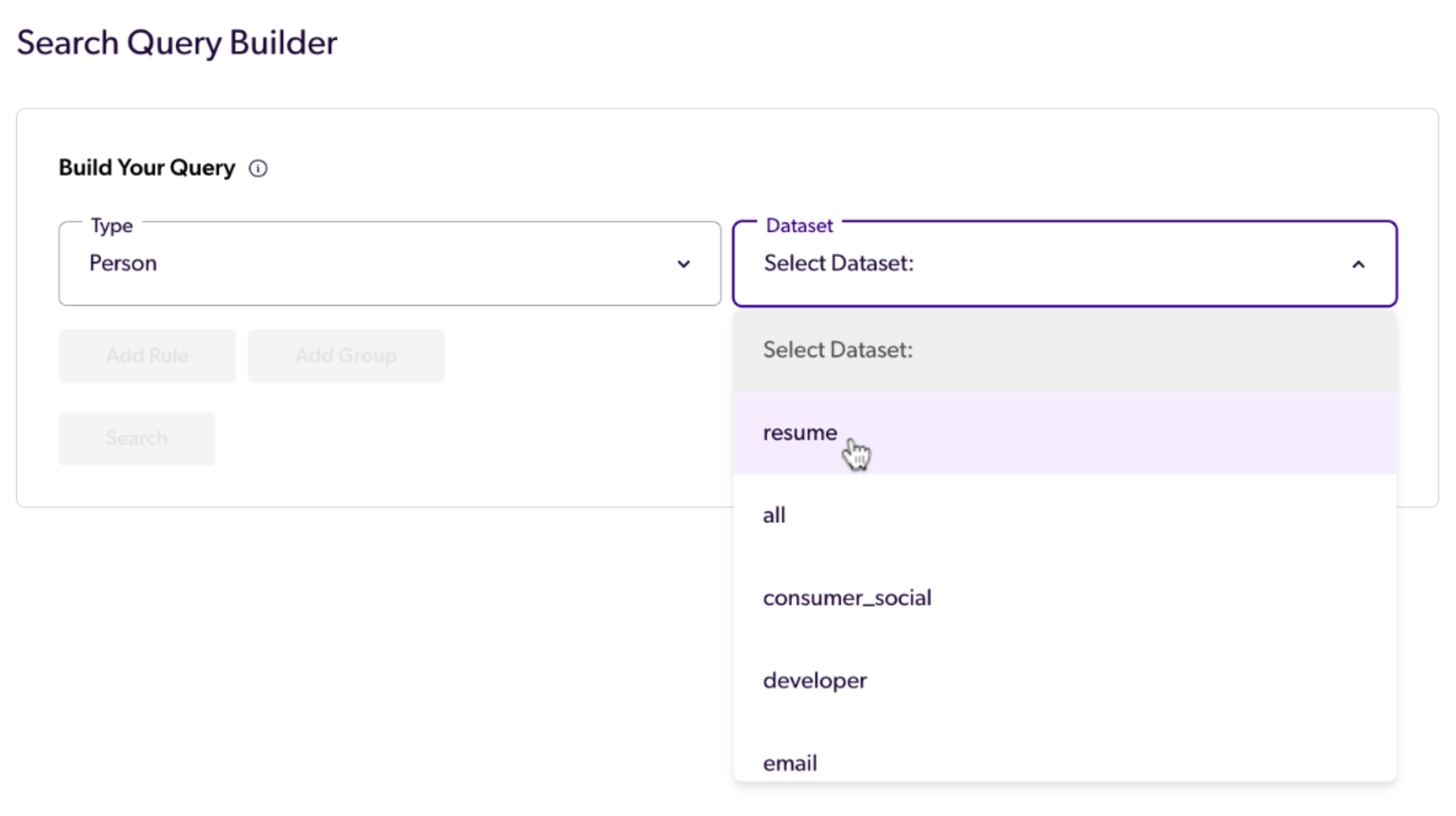 2. Select the **"Add Rule"** button to add a rule to determine which profiles should be returned.
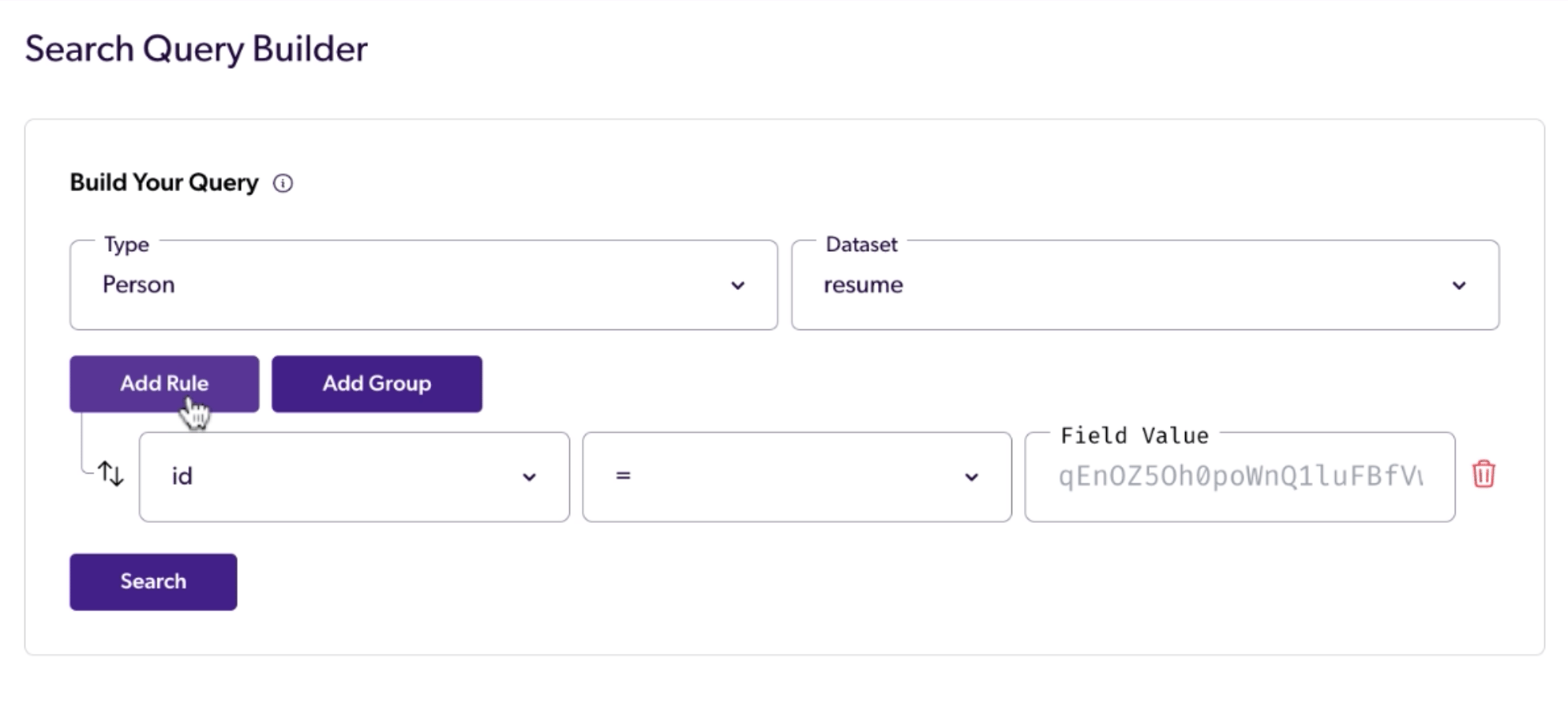 3. A dropdown menu will appear with a list of available **fields** based on the selected data type. Input parameters correspond to fields from the [Person](/docs/person-data-overview) or [Company](/docs/company-data-overview) datasets.
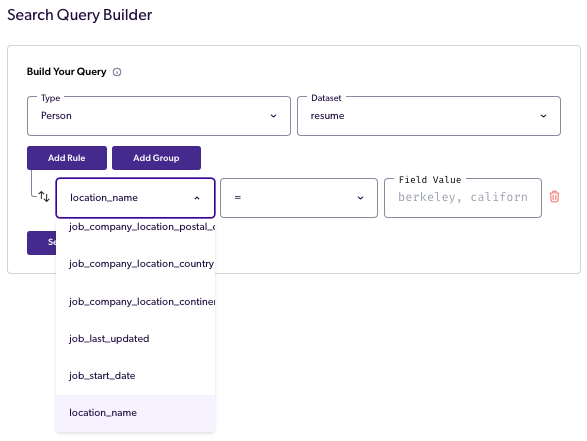 4. Once the field is selected, choose the [Matching Logic](/docs/matching-logic-options) you want to use.
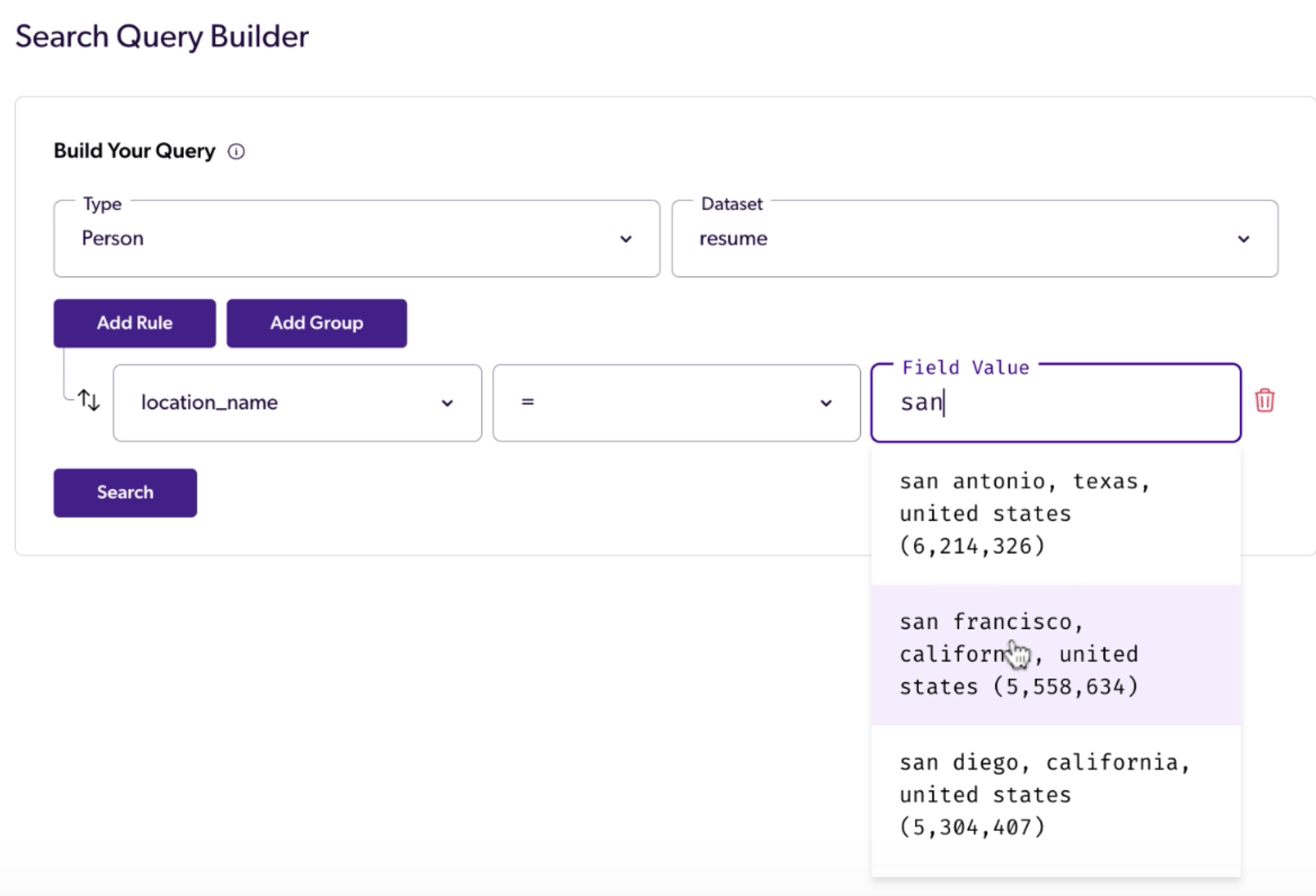
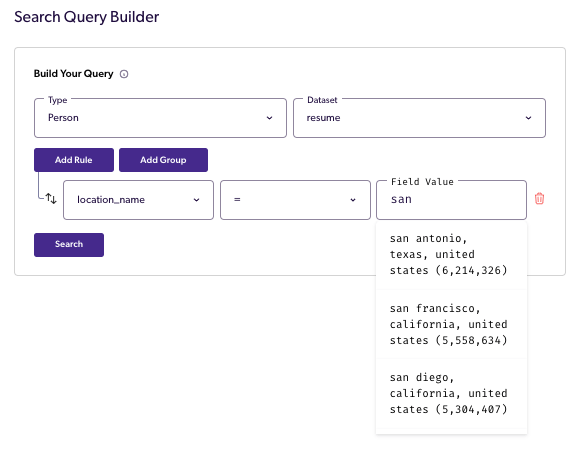 5. Next, define the **field value(s)** for the rule. Fields with [canonical values](/docs/canonical-data) (such as `location_name`, `job_title`, `skills`, `industry`, `education.degrees`, `education.majors`, and more) will autocomplete as you type.
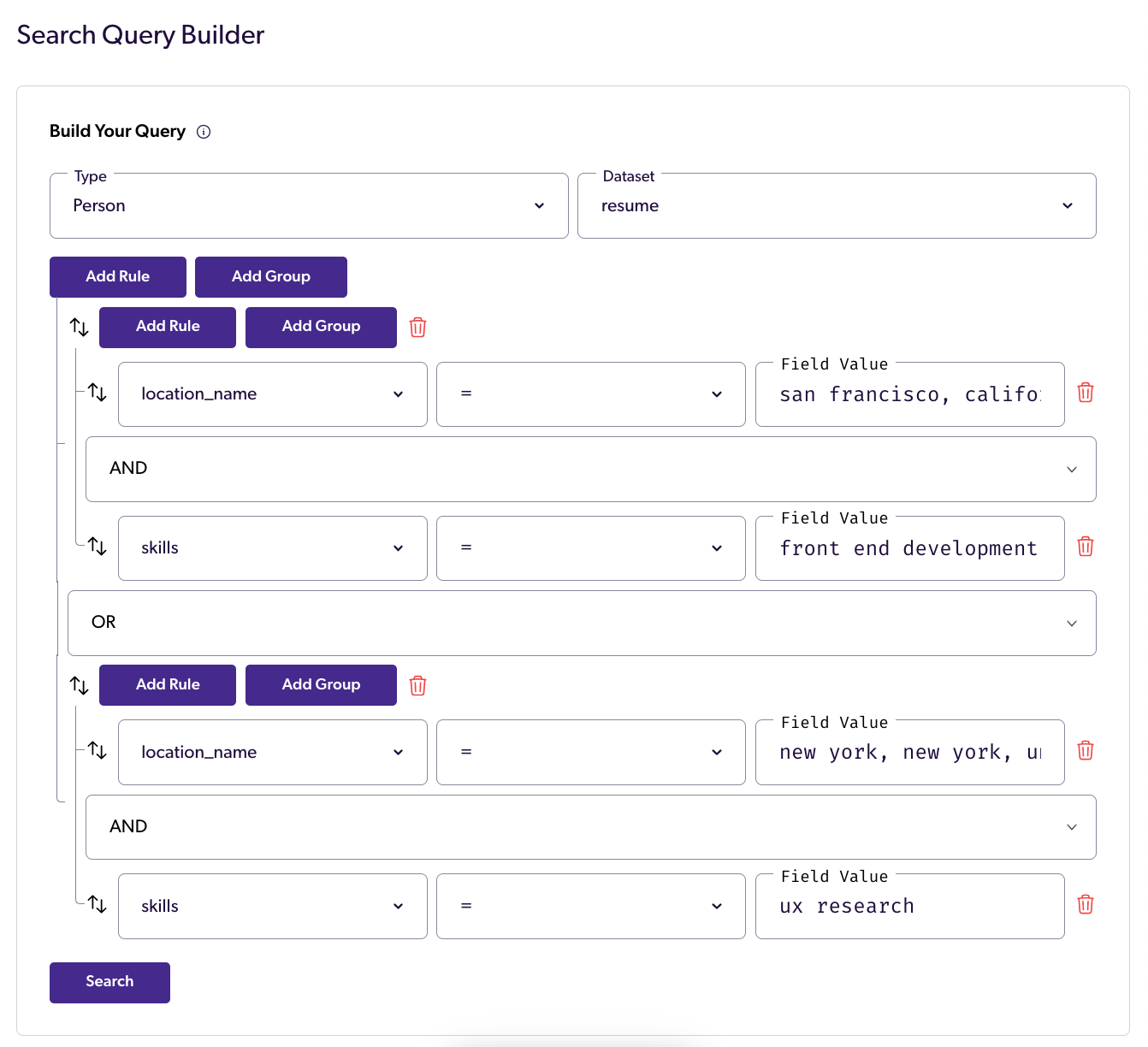
 6. For more complex queries, you can use the **"Add Group"** feature. Select the logical operator (`AND`, `OR`) to determine how the rules within the group will be combined. For example, if you want to match profiles that satisfy at least one rule within the group, select `OR`.
 7. Finally select **"Build Query"** to generate working code snippets that reflect your query. Code snippets are provided in PDL's JS SDK, Python SDK, Ruby SDK, and Go SDK, as well as pure Python, cURL, SQL, and ESQuery. Additionally, the tool will display the total number of profile matches for your query in real-time, without utilizing any API credits.
**Tips for Getting Started**
To get results quickly, simply copy the cURL snippet and replace `""` with [your API Key](/docs/quickstart#create-an-account). Paste the query into the the command line to retrieve the records.
## Example Query
The following example demonstrates how to create nested queries using the "Add Group" feature.
In this scenario, a recruiter wants to find Full Stack Developers in San Francisco and UX Researchers in New York. By utilizing the Query Builder tool, the recruiter can construct a query that meets these specific criteria.
## Where to Find It
Anyone interested in trying out the Query Builder can sign up for a [free API key](https://dashboard.peopledatalabs.com/signup) and access the tool through the [API dashboard](https://dashboard.peopledatalabs.com/tools/query-builder).
## For More Information
For more information, check out our detailed walkthroughs of the Query Builder:
* [https://blog.peopledatalabs.com/post/how-to-find-candidates-using-a-job-description](https://blog.peopledatalabs.com/post/how-to-find-candidates-using-a-job-description)
## Related topics
- [November 2025 Release Notes](/changelog/november-2025-release-notes-v321.md)
- [October 2025 Release Notes](/changelog/october-2025-release-notes-v320.md)
- [September 2025 Release Notes](/changelog/september-2025-release-notes-v312.md)
- [August 2025 Release Notes](/changelog/august-2025-release-notes-v311.md)
- [October 2021 Release Notes](/changelog/october-2021-release-notes-v16.md)
7. Finally select **"Build Query"** to generate working code snippets that reflect your query. Code snippets are provided in PDL's JS SDK, Python SDK, Ruby SDK, and Go SDK, as well as pure Python, cURL, SQL, and ESQuery. Additionally, the tool will display the total number of profile matches for your query in real-time, without utilizing any API credits.
**Tips for Getting Started**
To get results quickly, simply copy the cURL snippet and replace `""` with [your API Key](/docs/quickstart#create-an-account). Paste the query into the the command line to retrieve the records.
## Example Query
The following example demonstrates how to create nested queries using the "Add Group" feature.
In this scenario, a recruiter wants to find Full Stack Developers in San Francisco and UX Researchers in New York. By utilizing the Query Builder tool, the recruiter can construct a query that meets these specific criteria.
## Where to Find It
Anyone interested in trying out the Query Builder can sign up for a [free API key](https://dashboard.peopledatalabs.com/signup) and access the tool through the [API dashboard](https://dashboard.peopledatalabs.com/tools/query-builder).
## For More Information
For more information, check out our detailed walkthroughs of the Query Builder:
* [https://blog.peopledatalabs.com/post/how-to-find-candidates-using-a-job-description](https://blog.peopledatalabs.com/post/how-to-find-candidates-using-a-job-description)
## Related topics
- [November 2025 Release Notes](/changelog/november-2025-release-notes-v321.md)
- [October 2025 Release Notes](/changelog/october-2025-release-notes-v320.md)
- [September 2025 Release Notes](/changelog/september-2025-release-notes-v312.md)
- [August 2025 Release Notes](/changelog/august-2025-release-notes-v311.md)
- [October 2021 Release Notes](/changelog/october-2021-release-notes-v16.md)