

What are Direct Downloads
Direct Downloads are our generally available Pull option for Data License delivery. PDL hosts your licensed datasets in a secure PDL-managed location, and you download each delivery on your schedule.
Push vs Pull Deliveries
Historically, People Data Labs only offered a Push delivery model for Data License customers, where we send your dataset directly to a storage location that you own and have configured, such as S3, Azure, GCP, or Snowflake. Direct Downloads give you a Pull alternative: instead of maintaining the destination bucket, you retrieve files from a PDL-hosted location.

Push: Delivery initiated by PDL and pushed to customer-managed delivery location.

Pull: You download data from a PDL-hosted location.
Why Switch to Direct Downloads
- Less setup: PDL hosts the delivery location, so you do not need to create and maintain your own destination bucket.
- Flexible retrieval: Download deliveries when it is most convenient for your team.
- Secure access: Use SFTP, SSH, the AWS CLI, or AWS SDKs with credentials managed through the PDL Dashboard.
- AWS-native option: IAM Role Access supports role-based AWS access for automated, large-scale downloads.
- No additional cost: Direct Downloads and AWS IAM Role Access do not add delivery charges.
Choosing an Access Method
There are two supported methods of accessing your data when using the Direct Downloads delivery method:RecommendationOur general recommendation is to use the AWS IAM Role Access authentication method whenever possible as this offers more scalable file transfer workflows as well as more streamlined and robust security configurations.
How to Get Started
- Contact your CSM Let your Customer Success Manager know you’d like to switch to Direct Downloads. Our team will handle the backend setup and spin up your secure bucket. Note: a minor contract amendment for the adjusted delivery location may be required.
- Choose your access method Once we have enabled Direct Download for your account, go to the License Delivery area of your PDL Dashboard and choose either SFTP or AWS IAM Role Access.
-
Set your credentials For SFTP, retrieve your username and set up your password or SSH key. For AWS IAM Role Access, enter your AWS IAM role ARN and save your credentials.
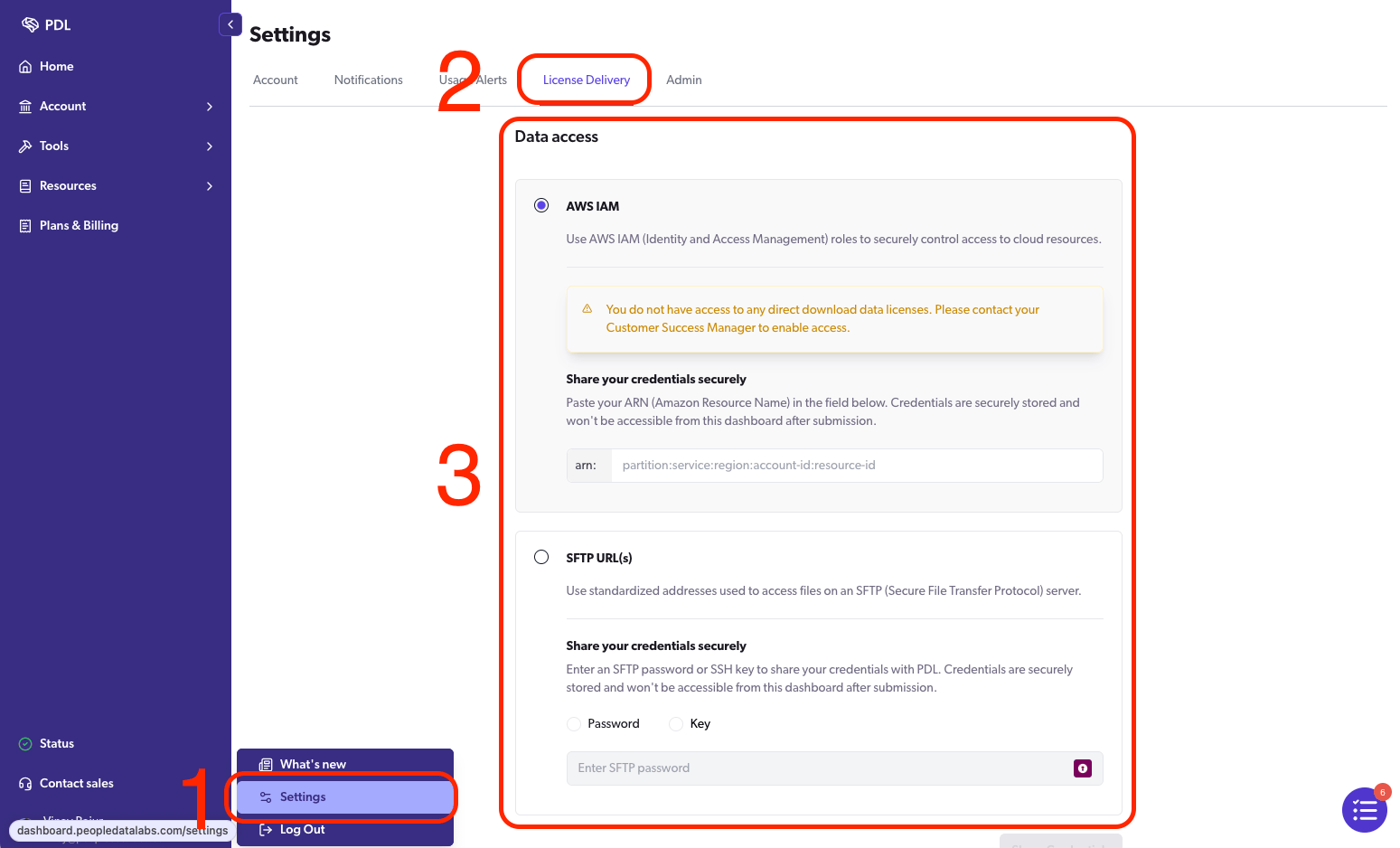
Accessing and configuring credentials in the PDL Dashboard
- Connect and download You will get a notification each time a new dataset is delivered. Once the delivery is ready, download it using your selected access method.
Access Direct Downloads with AWS IAM Role Access
AWS IAM Role Access is an additional authentication method for Direct Download customers. It lets you use regular AWS access patterns to retrieve data from a PDL-hosted S3 location. This is different from Data Delivery Using S3. Standard S3 delivery is a Push delivery method where PDL writes data to a bucket you own. Direct Download with AWS IAM Role Access is a Pull delivery method where PDL hosts the delivery location and you retrieve the files from PDL. To use AWS IAM Role Access:- Create or choose the AWS IAM role that your team will use to retrieve Direct Download data.
- Copy the role ARN. It should use this format:
arn:aws:iam::<account-id>:role/<role-name>. - In the PDL Dashboard, go to License Delivery and choose AWS IAM Role Access.
- Enter your IAM role ARN and select Update Credentials.
- After PDL configures access, use the S3 path shown in the dashboard to retrieve future deliveries.
Shell
s3:ListBucket and s3:GetObject. If your team uses AWS SSO, CI/CD roles, or another role-assumption workflow, use the role that will be active when your download process runs.
If your security team needs the exact trust policy, access point ARN, or bucket policy requirements, contact your Customer Success Manager.
Switching Authentication Methods
You can switch between SFTP and AWS IAM Role Access in the PDL Dashboard.
Changing authentication methods only changes where future deliveries are made available. Previously delivered data remains in the old location and is not automatically copied to the new location. If you need previously delivered data copied to the new location, contact your Customer Success Manager.
Access Direct Downloads with SFTP
If you use SFTP, connect with your preferred SFTP client using the following details:- Host:
pdl.sftp.peopledatalabs.com - SFTP URL:
[username]@pdl.sftp.peopledatalabs.com: - Port:
22 - Authentication: username and password, or SSH key
SFTP dashboard walkthroughThe video below shows the Direct Download dashboard and SFTP setup flow. It does not yet show the AWS IAM Role Access configuration options. For IAM setup, use the steps in Access Direct Downloads with AWS IAM Role Access.
Shell
Delivery Completion Files
Direct Download deliveries also include a top-levelCOMPLETED file when the full delivery is finished. Use this file as the signal that your download and ingestion workflows can begin.
For more details on completion signals and delivery readiness, see Data License Ingestion.
Frequently Asked Questions
Is Direct Download secure?
Is Direct Download secure?
Yes. Direct Download supports secure SFTP access and AWS IAM Role Access. With AWS IAM Role Access, your team can use AWS-native, role-based access for automated downloads.
Is AWS IAM Role Access replacing SFTP?
Is AWS IAM Role Access replacing SFTP?
No. SFTP remains supported. AWS IAM Role Access is an additional Direct Download authentication method for customers who prefer AWS-native workflows.
Can I switch from SFTP to AWS IAM Role Access later?
Can I switch from SFTP to AWS IAM Role Access later?
Yes. You can change your Direct Download authentication method in the PDL Dashboard. The change applies to future deliveries only.
Can I connect using command line tools?
Can I connect using command line tools?
Yes. For SFTP, you can use tools like
sftp or compatible SFTP clients. For AWS IAM Role Access, you can use the AWS CLI, AWS SDKs, or direct S3 API calls.When are deliveries made?
When are deliveries made?
Delivery timing doesn’t change: your data will still be delivered according to your current monthly or quarterly schedule. You’ll get an email notification when it’s ready to download.
Will older deliveries be available?
Will older deliveries be available?
By default, any data placed in the bucket will expire after 110 days in order to conserve resources. This allows for some wiggle room if you need any past deliveries.
What happens to older deliveries if I switch authentication methods?
What happens to older deliveries if I switch authentication methods?
Older deliveries remain in the location associated with the access method that was active when they were delivered. Switching authentication methods does not copy older deliveries to the new location automatically.
Does AWS IAM Role Access cost extra?
Does AWS IAM Role Access cost extra?
No. AWS IAM Role Access is available for Direct Download customers at no additional cost.